What are Slack Tickets?
Last updated: May 17, 2024
Slack Tickets are customer facing, as opposed to Conversations which are invisible to the customer.
Here's a sample of what a Slack Ticket looks like:
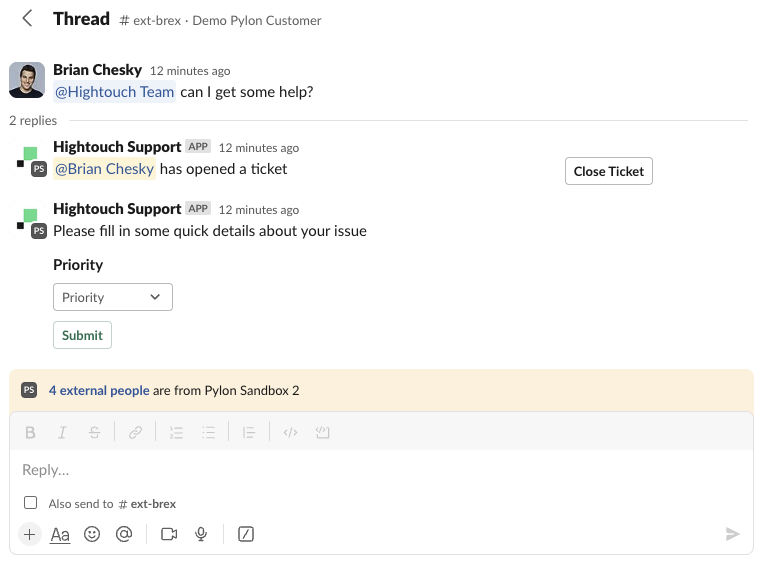
You should enable them if you want your customers to feel like they have a more structured process for getting support as they will then know their request is tracked and has a status. Tickets will also automatically be tracked in their Customer Portal, if you have it enabled for them.
Some benefits to your team include that it:
Keeps the entire conversation threaded
Allows you to collect additional data from the customer
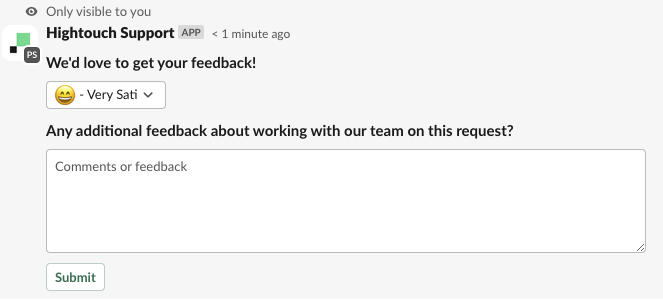
Allows you to collect a CSAT score (turn on here)
Instructions on how to turn on Slack Ticketing here.