Generate and maintain your Support Agent's Internal Knowledge Base
Last updated: October 30, 2026
Agent Knowledge (Internal) turns answers from resolved support issues into reusable knowledge for your agents. Pylon looks for information missing from existing documentation and generates internal articles so your team does not have to write every answer from scratch.
This is an automatically managed, private knowledge base in your workspace. It is not a separate public help center, and selecting an agent for validation does not create a private knowledge base exclusively for that agent.
Generate knowledge from resolved issues
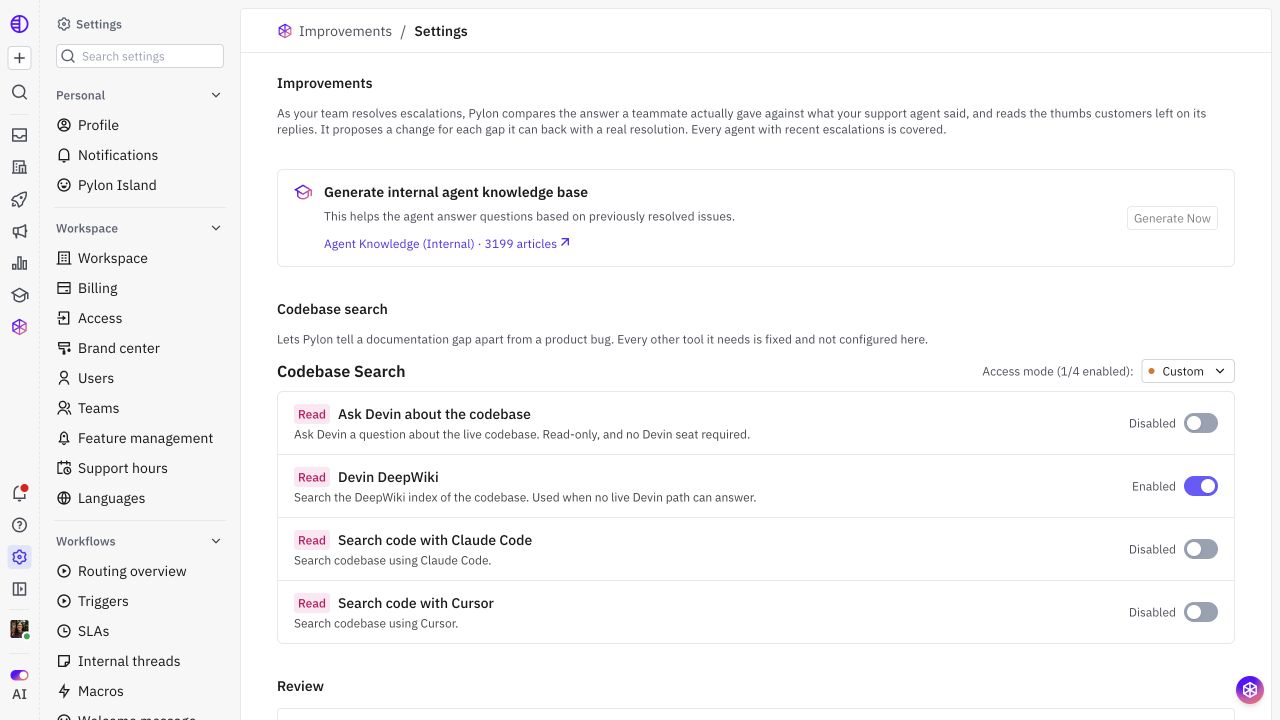
Open Settings → AI controls → Improvements, then open Settings.
Find Generate internal agent knowledge base and select Generate Now. The generation entry point is also available in supported agent setup and Resources flows.
In the dialog, optionally add Issue filters to narrow the issues Pylon should learn from. For example, start with a product area or a support team whose resolved answers are representative.
Choose whether to enable Auto approve internal agent articles.
Select Generate Now to start the scan.
The scan runs in the background and can take up to a few hours. You can keep working while it runs. Once the knowledge base is available, follow the Agent Knowledge (Internal) link to inspect the generated articles.
The generation uses recent closed issues with customer participation and a human teammate reply. It scans up to the newest 1,000 matching issues; it does not necessarily process your entire issue history.
Pylon reviews related conversations, looks for a substantive answer from your support team, and compares that answer with existing knowledge. It can create a new article for a missing answer or update overlapping content in the Agent Knowledge (Internal) KB.
If codebase search is configured in Improvements settings, Pylon can use it to check product behavior and help distinguish a documentation gap from a product bug.
Choose whether generated articles need review
The generation dialog’s Auto approve internal agent articles checkbox controls publication for that scan:
Setting | What happens |
|---|---|
On | Pylon can approve and publish the generated internal articles without a teammate reviewing each one first, making them available to applicable agents. |
Off | Pylon creates or updates drafts. A teammate must review and publish them before the new content is available to agents. |
“Publish” here means making an article available within the internal knowledge base. It does not publish the article to your public help center.
Keep knowledge up to date with Improvements
The initial scan builds a starting knowledge base from past support conversations. Ongoing Improvements help maintain it as your team resolves escalations and customers leave feedback on agent replies.
In Improvements settings → Review, the Apply internal articles without review toggle controls ongoing eligible internal article proposals. This is separate from the checkbox used when starting a generation scan.

Off: Eligible article changes wait for a teammate to review and apply them.
On: Pylon can apply and publish eligible changes to Agent Knowledge (Internal) without individual review. Enabling it also processes eligible open article proposals already waiting for review.
Turning it off later: Stops automatic application of subsequent proposals. It does not undo articles already applied or published.
Before enabling this setting, read and acknowledge the warning shown in the UI. An incorrect or sensitive statement can reach a customer through an agent’s answer even though the source article stays internal.
Automatic application has boundaries. Customer-facing articles, Skill changes, Guidance changes, and knowledge bases that require approval still need review. The automatic path is limited to the agent-managed internal knowledge base; updates to articles a person has edited also remain subject to review.
How agents use Agent Knowledge (Internal)
Agent Knowledge (Internal) is automatically included as an agent resource. Its Resources switch is enabled and cannot be switched off like an optional external source. You do not need to attach it manually to each agent.
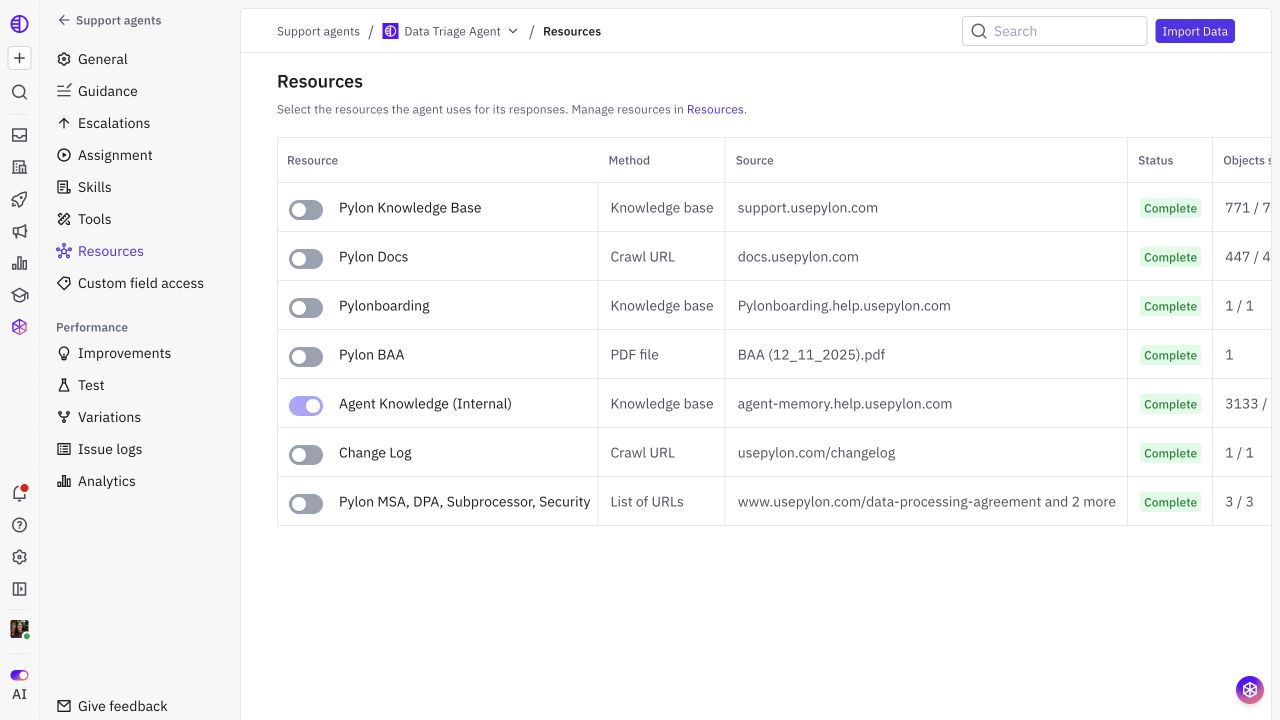
Only published, processed content that the agent can access should be expected to inform answers. A draft saved for review is not the same as knowledge available to the agent.
Review the results
Open Agent Knowledge (Internal) and check a sample of generated articles:
Compare each answer with the underlying support resolution and current product behavior.
Check that account-specific facts have not become general instructions.
Correct incomplete, conflicting, or sensitive content before publishing a draft.
Test a question that requires the new knowledge and check the agent’s answer and retrieved sources.
Review future proposals in Improvements and revisit articles when product changes make their answers outdated.