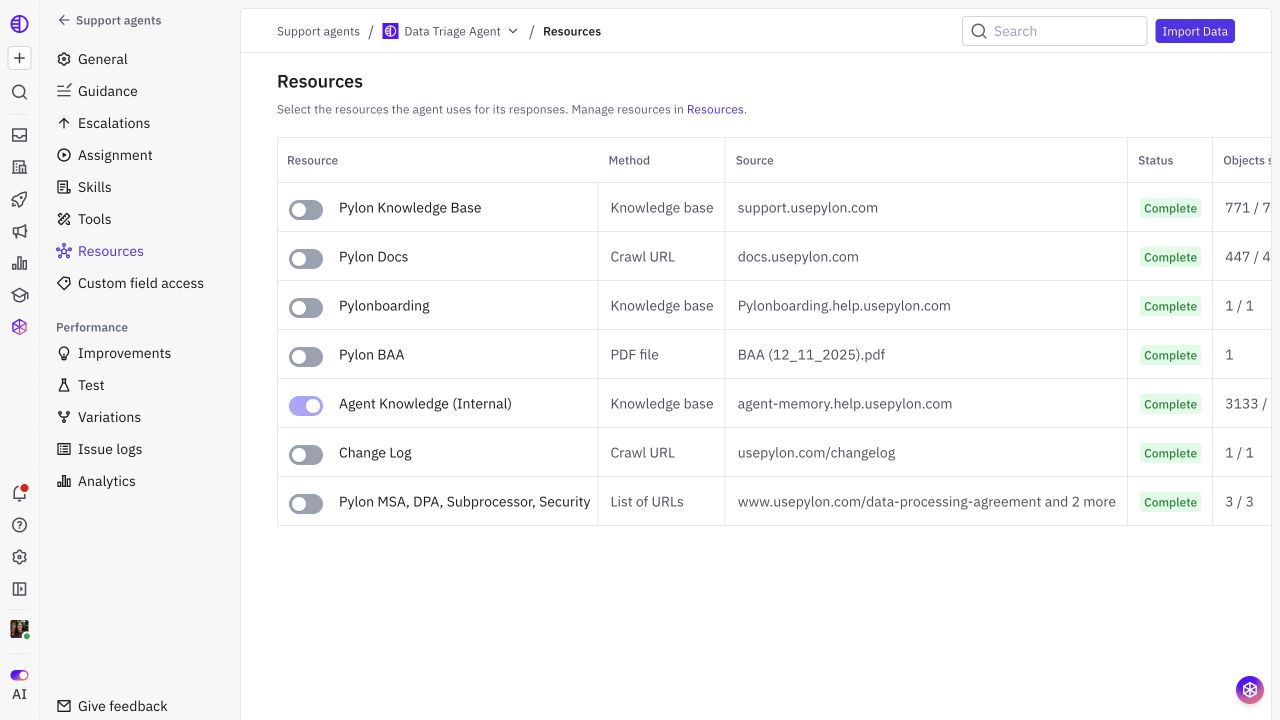
Knowledge sources for your Support Agent
Last updated: October 30, 2026
Your Support Agent can draw on several types of knowledge: articles in Pylon, automatically generated internal knowledge, external documentation, uploaded files, and content supplied through the Training Data API.
Use these sources together to give the agent the information it needs to answer customer questions. A source provides facts; the agent’s Guidance, Skills, and Tools determine how it behaves and what actions it can take.
Knowledge sources at a glance
Source | What it provides | When to use it |
|---|---|---|
Pylon Knowledge Base | Articles maintained in your Pylon help center, subject to the agent’s access settings. | Product documentation, setup guides, FAQs, and troubleshooting answers your team already maintains in Pylon. |
Team-maintained internal knowledge | Internal articles and collections your team writes and reviews in Pylon. | Reusable support knowledge that should inform answers without appearing in your public help center. |
Agent Knowledge (Internal) | An automatically managed private knowledge base generated from gaps found in resolved support issues and maintained through Improvements. | Capture answers your support team has already given and fill gaps in documented knowledge. |
External documentation | Content imported from public URLs or supported documentation repositories. | Keep an existing documentation site or repository as the source your team maintains. |
Uploaded files | Documents imported directly as agent resources. | Approved reference material that is available as a file rather than a maintained website. |
Training Data API | Knowledge your own systems send to Pylon programmatically. | Build a managed ingestion process for content that needs a custom integration or cannot be imported through the standard UI. |
Pylon Knowledge Base
Articles in your Pylon Knowledge Base can provide the agent with the same product information your customers and teammates use. This is a good starting point when your team already maintains documentation in Pylon.
An article’s human visibility and its Support agent access are separate controls. A public article is not automatically available to every agent, and an internal article may be available to an agent when its access settings permit it. Check both the agent’s selected Resources and the effective collection/article access settings.
Team-maintained internal knowledge
Your team can write and curate internal articles for answers that do not belong in a public help center. Examples include a troubleshooting reference, detailed product limitations, or a support explanation that needs more context than a public FAQ.
Your team owns the content and its review process. Keep the information reusable and accurate, and choose which agents can access it. Internal visibility keeps the article itself private; an agent with access can still use its contents when answering customers.
Agent Knowledge (Internal)
Agent Knowledge (Internal) is Pylon’s automatically managed private knowledge base. Pylon learns from substantive answers in resolved support conversations, identifies missing or incomplete knowledge, and creates or updates internal articles.
You can generate an initial knowledge base from past issues and use Improvements to maintain it as new gaps emerge. Review controls determine whether eligible generated articles wait for a teammate or are applied and published internally without individual review.
This resource is automatically included for agents; its enabled Resources switch cannot be turned off like an optional external source. It is distinct from an internal knowledge base your team manually curates.
For generation steps and publishing controls, see Generate and maintain Agent Knowledge (Internal).
External documentation
If your documentation lives outside Pylon, you can import it as a resource instead of rewriting it in the Pylon Knowledge Base.
Available import methods include:
Public URLs: Crawl a public documentation site or import specific pages.
Supported external documentation sources: Import documentation from GitHub-backed sources, including supported GitHub, GitBook, and Mintlify setups. Private-source access depends on the configured integration and permissions.
Public code repositories: Import a public GitHub repository as code context where that import method is available.
A public URL crawl does not authenticate into an arbitrary private website. Use a supported authenticated source or a custom ingestion process for private content.
See Connecting external documentation for setup details.
Uploaded files and the Training Data API
File imports let you add supported documents directly. They are useful for reference material that does not have a suitable website or integration. Include replacing outdated files in your maintenance process; a one-time upload should not be assumed to track later edits to the original document.
The Training Data API lets your systems supply knowledge programmatically. Use it when you need control over how content is assembled, sent, updated, and removed. Your integration should maintain that content as the underlying source changes.
Account context and live information
Knowledge sources explain your product and support policies. Some answers also require information about the specific customer or issue.
Account and issue fields provide permitted context about the customer and conversation.
Connectors and Tools can retrieve live information from other systems or perform supported actions.
These complement the knowledge base. For example, documentation can explain how a feature works, while an account field or tool tells the agent whether that customer has it enabled. Configure field access and tools separately from knowledge Resources.
Choose and validate your sources
Open your agent’s Resources to review the available sources and select the optional resources it should use. Different agents can use different source sets.