Customizing AI Agent access in Knowledge Base
Last updated: February 19, 2026
You can customize the level of AI Agent access for specific collections and articles in your knowledge bases. This allows you to enable agents to help with appropriate content, in conjunction with 📄 How to Control Access to Knowledge Base Articles.
Pre-requisites
First, make sure to add the knowledge base as a training data resource for your AI Agent. See details here.
Setting access levels
For collections
Navigate to a collection at https://app.usepylon.com/docs/
Click the Settings tab
Scroll to AI Agent Access
For articles
Navigate to an article at https://app.usepylon.com/docs/
Click its Settings tab
Scroll to AI Agent Access
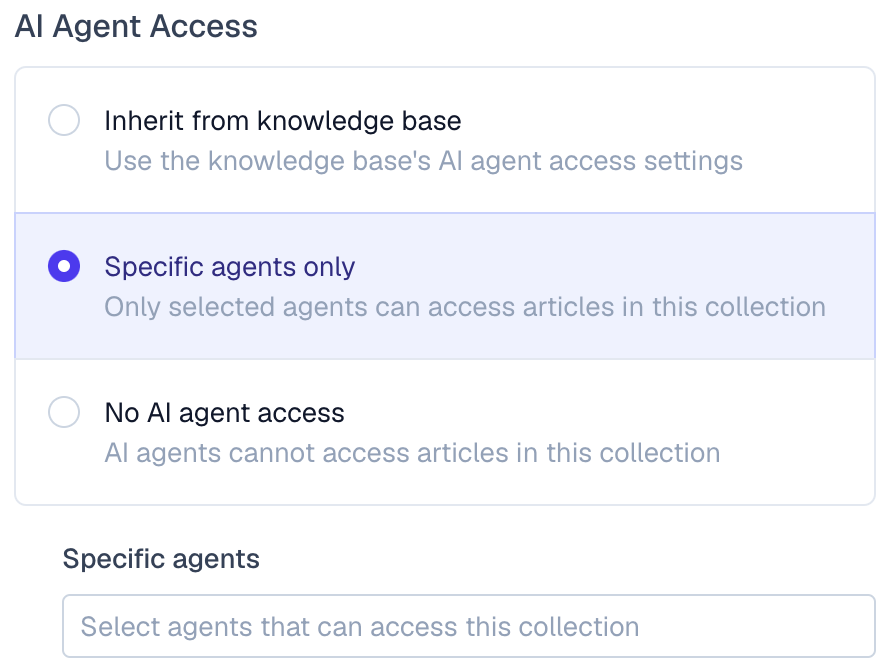
Access options
Inherit from parent (default): this uses the knowledge base or parent collection's AI agent access settings
Specific agents only: only selected agents can access the given article or collection
No AI agent access: AI agents cannot access the given article or collection
Important: inheritance rules
Access permissions flow downward and must become increasingly restrictive. Child items cannot have broader access than their parents.
✅ Allowed:
Public FAQ Collection: Inherit (all agents)
Internal Policies sub-collection: Specific agents (Customer Support Bot only)
Refund Policy article: Inherit (Customer Support Bot only)
Security Protocols article: No agent access
Pricing article: Specific agents (Sales Bot only)
❌ Not allowed: sub-collection allows different AI agent access than the collection
Internal Policies collection: Specific agents only (Customer Support Bot only)
Pricing sub-collection: Specific agents only (Sales Bot only)
❌ Not allowed (sub-collection allows higher AI agent access than the collection):
Internal Policies collection: Specific agents only (Customer Support Bot only)
Pricing article: Specific agents only (Customer Support Bot, Sales Bot)