Similar articles detection
Last updated: July 13, 2026
Pylon can detect when a Knowledge Base article overlaps with existing content. This helps support teams keep their Knowledge Base clean, avoid duplicate articles, and decide when related content should be combined.
How similar article detection works
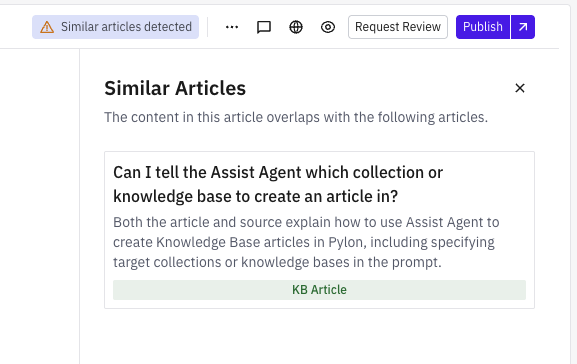
When Pylon detects that the current article is similar to another Knowledge Base article, a Similar articles detected button appears in the article editor header.
Clicking this button opens a panel with the related articles. Each result explains why the articles are similar, so you can quickly compare them and decide whether to keep them separate or combine the content.
When to use it
Use similar article detection when reviewing or publishing Knowledge Base content. It is especially helpful when:
Creating a new article that may overlap with existing documentation
Cleaning up duplicate or near-duplicate articles
Deciding whether two articles should be merged
Keeping your Knowledge Base easier for support teams and customers to navigate
What to do when similar articles are detected
Click Similar articles detected in the article editor header.
Review the similar articles shown in the panel.
Open any relevant article to compare the content.
If the articles cover the same topic, combine the useful content into one article.
Update, archive, or remove duplicate content as needed.