What if I accidentally selected the wrong channel type when adding the Pylon app to a Slack channel?
Last updated: February 23, 2026
If you've accidentally selected the wrong channel type when adding the Pylon app to the channel, it can be updated from within Pylon to the correct channel type.
Linked as an account channel but I want it to be a notifications channel
Find the account in Pylon that the channel was linked to on the accounts page and click in to view the account
On the right-hand sidebar in the 'External channels' or 'Internal channels' section (depending on which type of channel it was linked as) hover the channel name and click the 'x' on the right-hand side of the pill
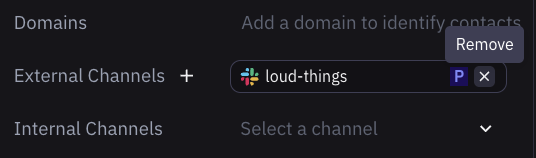
Linked as a notifications channel when it should be linked as an Account channel
Find the account in Pylon you want to link the channel to on the accounts page and click in to view the account
On the right-hand sidebar in the 'External channels' or 'Internal channels' section (depending on what type of channel you would like to link it as) search for the channel name you initially set up as a Notifications channel and click on it
It is now linked as an account channel to that account