How do I write an effective Skill?
Last updated: October 8, 2026
Skills are reusable instructions that teach Pylon agents how to handle a specific type of situation. The same skill can be used by different agents, and who runs the skill changes how you should write it. This guide covers the principles that apply to every skill, then the specifics for each agent type.
The best way to create a skill is to co-create it with the Assist Agent rather than handwriting it (see What are Skills?). This guide describes what a good skill looks like, so you can steer the agent while building one and refine it afterward.
First, decide who runs the skill
The two main contexts have different goals, audiences, and output:
Assist Agent skill | Support Agent skill | |
Who runs it | An automation pre-running on an issue, or a teammate invoking it interactively in chat | An autonomous agent handling the issue end to end |
Audience of the output | Your support team (output lands in the side panel or chat) | The customer (output is the reply that gets sent) |
Goal | Investigate, gather context, and recommend, so a human can act faster | Resolve the customer's issue or escalate cleanly |
Tone and detail | Internal: structured findings, evidence, links to tools, draft replies for review | Customer-facing: on-brand, no internal jargon or implementation detail |
A skill written for the Assist Agent produces a briefing for a teammate. A skill written for the Support Agent produces a message the customer reads. Mixing the two is the most common reason a skill feels off.
Principles that apply to every skill
1. Write the description as a trigger, not a summary
This is the single most important thing to get right. The agent decides which skill to use by reading descriptions, so the description should describe when to use the skill, using the words and symptoms that show up in real issues.
DO phrase it as "When ..." and name concrete situations.
DO include semantic clues related to what the issue is about.
DON'T summarize the steps the skill takes. If the description describes the workflow, the agent may follow that short summary instead of reading the full skill and skip half your instructions.
DON'T pack many unrelated scenarios into one skill. Split them into separate, focused skills.
Good: "When a customer asks about invoices, payment methods, refunds, renewals, or anything related to billing."
Avoid: "Looks up the account, checks invoice status, then drafts a reply with next steps."
2. Only reference tools the agent actually has
Skills can tell an agent to take actions such as looking up an issue, searching past tickets, querying logs, searching a codebase, creating a task, or calling an external API. Those actions rely on tools and connectors, and each agent has its own enabled tool set. If a skill references a tool or connector the agent does not have enabled, the agent will not be able to complete that step.
Pylon helps catch this by linting skills for references to missing connectors. If a skill mentions a connector or tool that is not enabled for the agent, Pylon can flag that mismatch so you can either enable the connector or update the skill before relying on it.
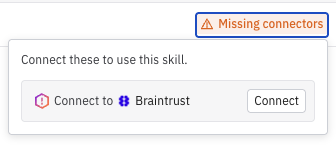
Before referencing a tool, check the specific agent’s tool settings and make sure that tool is enabled.
Do not assume tools are shared across agent types. Assist Agent, Support Agent, and other agents may have different tools available.
If the skill needs a missing tool, either enable that tool for the agent or rewrite the skill so it uses only the tools that agent already has.
When a tool is optional, include a fallback path. For example: “If you cannot access logs, summarize what can be confirmed from the issue and escalate to a teammate.”
3. Be concise - the agent is already capable
You do not need to explain how to write a polite email or what an invoice is. Only add instructions the agent could not guess: your policies, your edge cases, the phrasing you prefer, and the things it must never do. Every extra paragraph competes for the agent's attention.
4. Give it a clear structure and a defined output shape
A reliable skill reads like a playbook: goals, behavior for the main variations, and an explicit output shape. Skills that specify how the output should be structured produce far more predictable results than skills that leave it open-ended. The right output shape depends on the agent type, covered below.
5. Test and iterate before you rely on it
Do not assume a skill works on the first try. Simulate interactions and run it against past issues to see how the agent would have handled real situations (see Guide: Backtesting). Testing also surfaces missing tools quickly: if the agent cannot complete a step, check whether it has the tool that step needs. Writing a good skill is iterative: run it, watch where it goes wrong, tighten the instructions, and repeat.
Writing skills for the Assist Agent
Assist Agent skills run internally. An automation can pre-run the skill on an issue and drop the result into the side panel before your team arrives, or a teammate can invoke it interactively by typing / in chat. Either way, the output is a briefing for a human, not a message to the customer.
Write these skills to do the legwork and hand off a decision:
Tell it which data sources, logs, tools, or codebase locations to check (and confirm the agent has those tools).
Have it cite evidence so a teammate can trust and verify the finding.
End with a clear recommendation and, where useful, a draft reply the teammate can review and send.
Internal references, tool names, and links are fine here, because only your team sees the output.
A condensed example output shape for an investigation skill:
## Findings
- What the customer is asking
- Evidence checked (logs, account state, related tickets) with links

## Verdict
Bug / expected behavior / user error / needs more info

## Recommended next step
- Suggested action for the teammate
- Optional draft reply for review
Writing skills for the Support Agent
Support Agent skills run autonomously and respond directly to customers. Here the output is the reply the customer receives, so tone, accuracy, and guardrails matter much more.
Specify the tone and keep it on-brand. No internal jargon, tool names, or implementation detail.
Be explicit about what the agent must not do, especially for money, legal terms, commitments, or account changes.
Tell it when to stop and escalate to a human instead of guessing.
Give it safe phrasing to fall back on when it cannot confirm something.
If the skill depends on an action (looking something up, updating a field), confirm this agent has that tool enabled.
A condensed example for a customer-facing billing skill:
When responding to billing questions, be clear and careful not to guess.

## Behavior
1. Identify the type of billing question (invoice, refund, failed payment, renewal).
2. Use the available account and ticket context before answering.
3. If the exact answer is not available, do not infer billing policy. Escalate.

## Output shape (the customer-facing reply)
- Answer
- What you confirmed
- Next steps

## Avoid
- Guessing invoice status, refund eligibility, or contract terms
- Promising credits or deadlines without confirmation

## Preferred phrasing
- "Here is what I can confirm..."
- "I am not able to verify that from the current context."
- "This may need confirmation from our billing team."
Quick checklist
You know which agent will run the skill, and wrote the output for that audience.
Description starts with "When" and names real situations, without summarizing the steps.
Every tool the skill references is enabled for the agent that will run it.
Content has clear goals, behavior, and a defined output shape.
Assist Agent skills cite evidence and end with a recommendation or draft.
Support Agent skills have explicit "avoid" rules, escalation paths, and no internal detail.
Tested against real or sample issues before going live.
Common mistakes
Referencing a tool the agent does not have - the skill stalls or fails. Check the agent's tools first, or enable the missing one.
Internal investigation detail leaking into a customer reply - that skill was written for the Assist Agent; rewrite the output for the customer, or keep it as an Assist skill.
Description reads like a workflow summary - rewrite it as "when to use this."
One skill tries to handle every scenario - split it into focused skills, one situation each.
Vague instructions like "be helpful" - replace with specific behavior and examples.
No guardrails on a customer-facing skill - add explicit "avoid" rules and escalation paths.
Shipped without testing - simulate and backtest first.