How do Slack private channels and threads work in Pylon?
Last updated: October 6, 2025
As of October 2025, private channels from Slack will also be respected in Pylon.
To ensure continuity, Pylon prompts your workspace members in those private channels to "share with team" on Pylon. The shared channels' names and corresponding Issues can then be viewed by all your team members in Pylon, even ones who are not in this private channel on Slack.
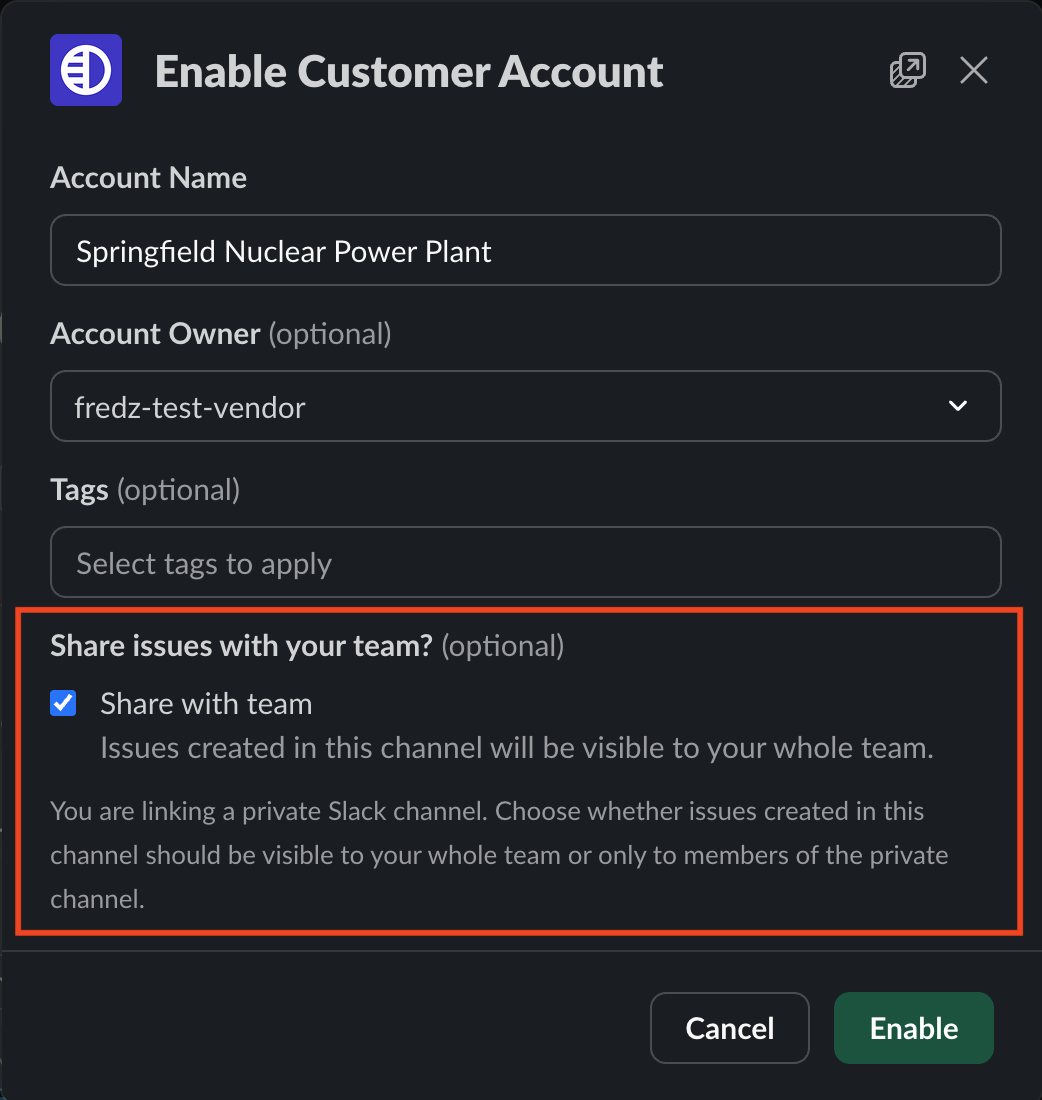
Note: support channels will most likely use Slack Connect, in which a channel lives in both your workspace and your customer's workspace. This behavior is only based on the channel privacy set within your workspace, and not the one set in your customer's workspace.
Public channels will not be affected as part of this change.
Example
In the following example, the company Acme is using Pylon to provide support to its customers, Banana, Cupcake, and Doodle.
The channels
#private_customer_bananaand#private_customer_cupcakeare private in the Acme Slack workspace. The team member Alice is in that channel, but Bob is not.
Alice chose to share the
#private_customer_banana, but not#private_customer_cupcake
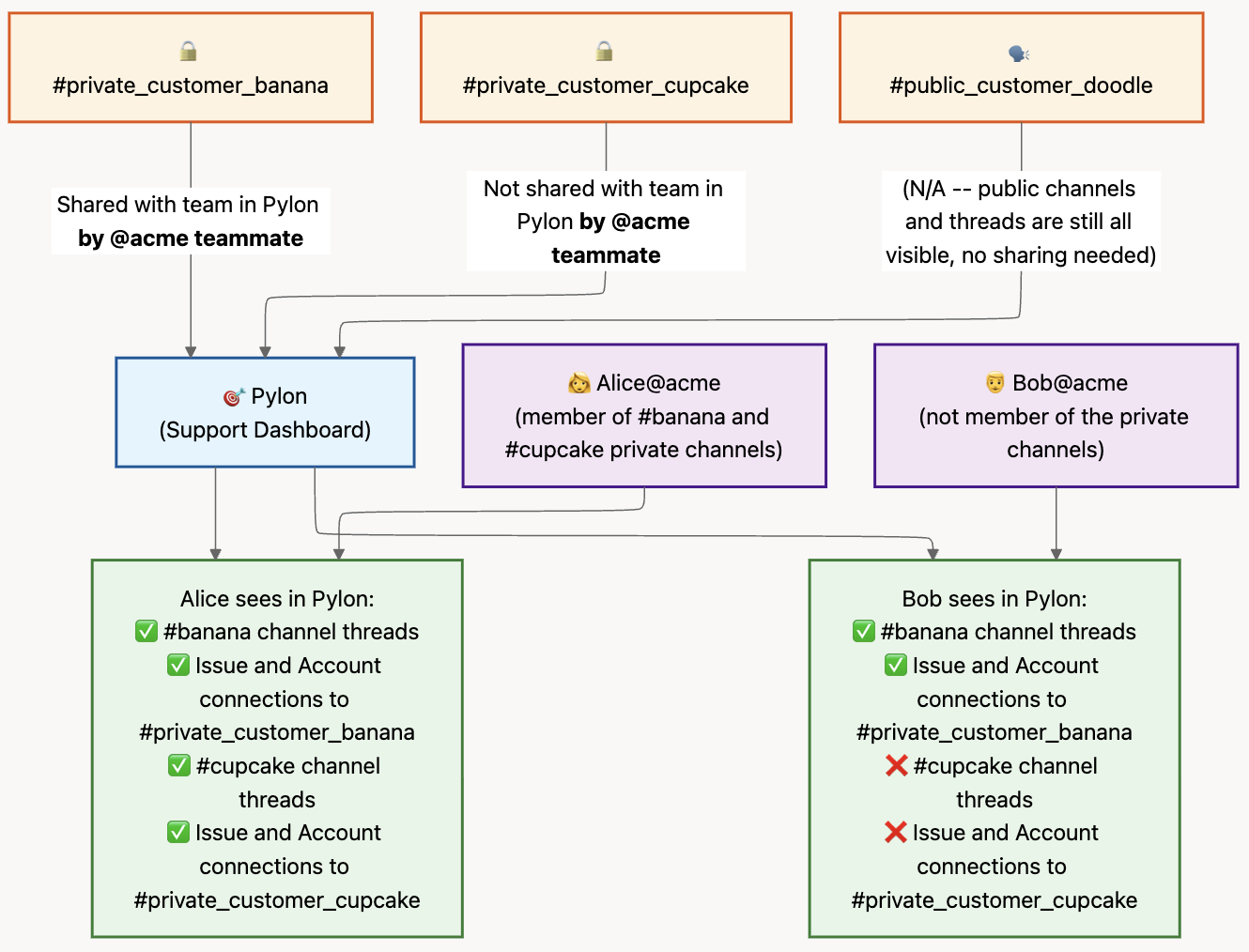
The result is:
Alice can see both the thread and references to all channels in Pylon:
#private_customer_banana,#private_customer_cupcake, and of course#public_customer_doodleBob can see threads and references to public channels (as before), as well as
#private_customer_banana's contents and channel nameBob also cannot see references to the
#private_customer_cupcakechannel. In the Accounts page, the Issues detail sidebar, and other surfaces, they will instead see that there is a Slack channel present as Private Channel
Timeline
Week of September 22: notification about behavior change
October 15: on Slack, your Support team will start to see the "share with team" flow when creating or joining private Slack channels
October 15: on Pylon, newly created private Slack channels will respect the private vs. shared distinction
Motivation
This change is a requirement for all Slack Marketplace integrations, to be compliant with Slack's privacy policy.
By default, only your team members in the private channel can see those threads as Issues in Pylon, and see the channel names in other places like the Accounts page. In other words, the private channel members keep full visibility.
To make it easy for your customers to continue receiving support, we prompt your team to share the channel where applicable.
FAQs
Q: How will this affect issues from public Slack channels in my workspace?
A: Issues from public channels will not change, since they already respect the Slack privacy model
Q: Will this affect the Internal Thread feature on Pylon?
A: No. Whether or not an issue originated from a private channel affects which teammates can see it on Pylon, but they will be able to share them in Internal Threads as before (similar to Slack's own model of resharing a DM)
Q: If I choose not to share, will Pylon still be able to process data from the channel?
A: Yes. As long as you added Pylon to the private channel (see 📄 How do I add Pylon to private Slack channels?), the channel's content will be processed. The above changes only intend to affect what your team members see in Pylon
Q: Can I default to "Share with team" for all current and future channels?
A: No. Unfortunately, as part of adhering to the Slack privacy policy, we need to get consent for each channel at this time