How do I turn off AI status changes?
Last updated: June 17, 2025
When a customer responds in an issue, Pylon uses AI to detect what the status should be. This is useful in many circumstances like:
Your team responds with "We're taking a look" and it stays on On You
Your customer responds with "Thank you!" and it stays in Closed
That being said, sometimes you need more deterministic behavior.
Disable AI Close
If AI closes an issue by accident, you may miss responding entirely. If the benefits don't outweigh the costs for AI closing, you can disable AI from closing issues from the Issue Status settings page.
Disable All AI Status Changes
If you don't want any AI status changes at all, including the ones that move issues between On You and On Customer, then you can also disable that from the Issue Status settings page.
At this point you have two options for behavior
Option 1: Manual Changes
By default, disabling status changes means responding won't change the status and you will have to edit the statuses manually each time. The downside is messages from customers on On Customer or Closed issues will not bump back to On You.
Option 2: Automatic Changes
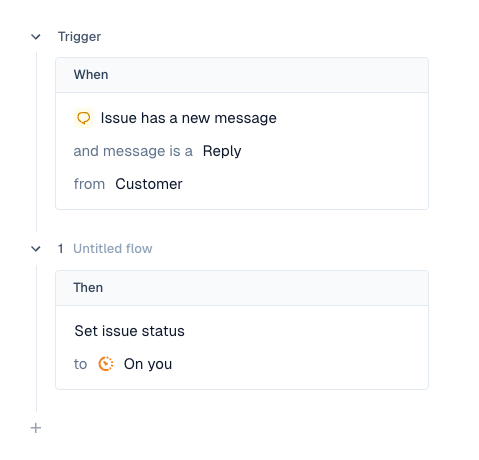
If you want any sort of automatic changes, you will have to set these up via triggers. You can setup a variety of different behaviors:
Moving issues to On You if a customer replies
Moving issues to On You if a customer or your team replies
Moving issues to On Customer if your team replies
To do this, head over to the triggers page and create the behavior you're looking for.
For example: