Best practices: Slack and Pylon
Last updated: August 25, 2025
Welcome to our Best Practices series, where we share best practices on how we and our customers setup and use Pylon. As we continue to grow and shape our products, our best practices will continue to be refined. Always welcome to your thoughts!
As a principle, Slack channels should have a dedicated purpose, and specifically a dedicated action for the people who are in the channel
Here are the most common examples of Slack channels used (most customers do not use all types)
External channels
Customer channels: 1:1 channels between you and a specific customer, typically named #ext-customer or #yourcompany-customer. They can be shared channels or ones where customers are single channel guest users. With Pylon added to these channels, all customer conversations will be tracked in Pylon as Issues by default - this happens regardless of emoji settings and is designed to power account intelligence and AI functionality. You can use ticket emojis to formalize conversations into tickets, and create filtered views (e.g., issue type=ticket) to focus on specific types of interactions.
Community channels: Community channels are when you have multiple different customers in one Slack channel. This is most common for Community Slack's where you might have a #help or #support channel that includes hundreds or even thousands of customers. We distinguish community vs customer channels so that we know whether the users in that channel all belong to the same organization or not. Similar to Customer Channels, you can add Pylon and track/respond to conversations in Pylon
Mirrored channels: Specifically used by companies with shared Teams channels with their customers, Discord, and or in-app chat, mirrored channels allow a support team monitor and respond to messages in Slack v the customer-facing channel (Teams, Discord, or in-app chat)
Understanding Issues vs Tickets
When Pylon is added to Slack channels, it automatically creates Issues from all customer conversations by default. This is important to understand:
Issues are always created: All customer messages automatically become Issues regardless of emoji settings. This powers Pylon's account intelligence and AI functionality.
Tickets are formalized Issues: The ticketing feature with emoji reactions doesn't prevent Issue creation - it formalizes existing Issues into tickets for tracking and workflow purposes. Configure this in ticket settings.
Welcome message considerations: Be careful when including ticket emojis in channel welcome messages, as these will automatically create tickets for every new channel. Consider using welcome messages as demonstration examples by explaining how the ticket emoji works rather than including the actual emoji.
Custom views for filtering: Create custom views in your Issues Dashboard to focus on specific types of Issues (e.g., "Issue Type = Ticket") to help manage and prioritize actual support requests while minimizing distractions from non-support conversations.
Internal channels
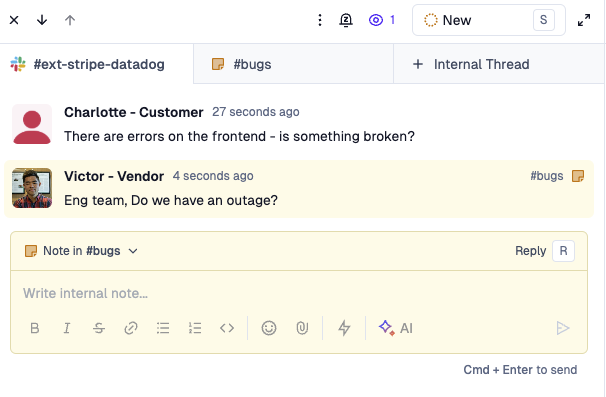
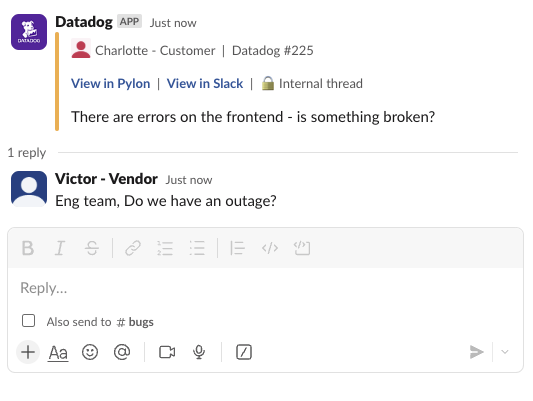
Internal thread channels: Dedicated Slack channels for specific internal teams or topics. This is most useful in cases where a specific team is not in Pylon, but needs to get informed of Pylon Issues. In Pylon's case, we have a
#bugschannel that all our Engineers monitor. Whenever customer inquiries require a question for Eng, we create an internal thread, ask the question to#bugs, and Engineers can respond directly in Slack
Notification channels: Slack channels specifically for alerts and notifications. These are actively monitored and work the exact same as any other Internal thread. But typically the teams who monitor notification channels see the alerts and will respond in Pylon after getting notified. At Pylon we have an
#sla-breachchannel that is monitored by our Support Team. Any messages sent there are top priority for them to review in Pylon and respondInternal Slack channel: Slack channel where one internal team asks questions to another internal team. We have
#product-questionswhere our GTM team can ask questions to our Support and Product team. See more here
Closing thoughts on internal channels
Most customers who use Slack as their communication platform internally fall into one of three buckets:
Support team lives primary in Slack: Triage channel is key as the one source of all Issues coming in from Customers. Support team will then triage and work Issues directly in the Triage channel, where they can tag other members of teams. Typically seen for smaller orgs, including orgs where people where many hats
Support team lives in Pylon, while other teams (customer facing and internal teams) live in Slack: Internal threads are used heavily to coordinate with teams not in Pylon
All Customer facing teams live in Pylon: Assignment within Pylon is used for all Issues passing between Customer facing teams. Internal threads are used only for non-customer facing teams. Notification channels are set up as needed for each team
Here's Pylon's Slack-Pylon setup:
At Pylon, our Support, Sales, and Customer Success teams all live in Pylon (bucket #3 from above). Here's our setup:
External channels #pylon-hightouch: For every customer
Highlights of our internal channels:
Internal threads:
#knowledge-base-articles: Whenever an Issue is flagged for needing an article, send to our Knowledge Base team for action#product-feedback: Whenever we receive an Issue labeled as Feature Request, send to our Product team to review#bugs: For all bugs#project-ai,#project-account-management, etc.: For specific questions to direct to a specific Engineering team#legal-helpdesk: For our Legal team
Notification channels:
#customer-success-alerts: Alerts our CS team to respond to issues, which our CS team does in Pylon#sla-breach: For all breached SLAs#new-leads: Whenever new leads write to us in Ticket Form, send to our Sales team#prospect-alerts: Alerts our Sales team for any Issues from our Prospect customers