Writing good guidance
Last updated: October 30, 2026
Good Guidance gives your Support Agent clear, reusable instructions for how to communicate and use information. Keep it short, specific, and applicable across conversations.
Use the separate Escalation settings for handoff criteria, routing, and customer-facing escalation messages. Use Skills for scenario-specific procedures and Resources for product facts.
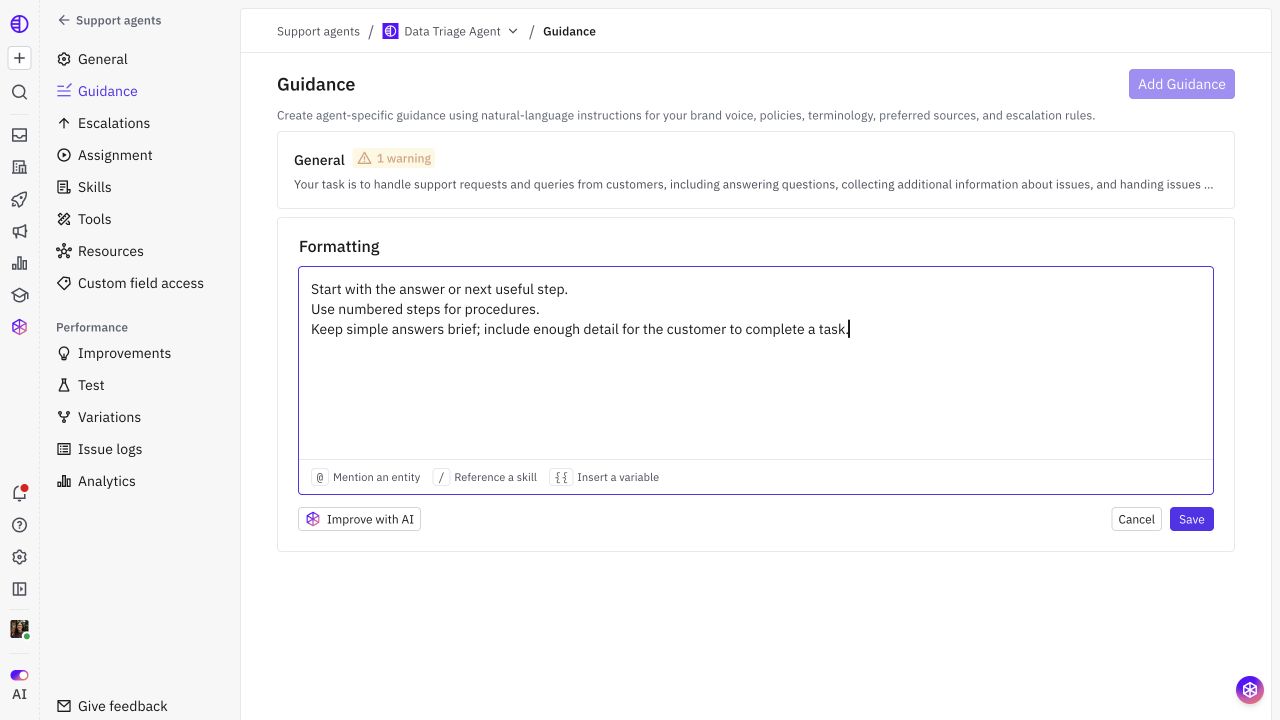
Give each section one job
Organize instructions into focused sections such as General, Tone, and Formatting. Use a descriptive title when adding a custom section, such as Terminology or Source accuracy.
Every Guidance section contributes to the agent’s broad instructions. Splitting a workflow into another Guidance section does not make it load only for that scenario; use a Skill for that purpose.
Section | What to include |
|---|---|
General | Company identity and broad communication rules not covered elsewhere. |
Tone | Formality, brevity, technical depth, and preferred language. |
Formatting | How to structure prose, lists, procedures, links, and code. |
Terminology | Approved names and terms, including words to avoid. |
Source accuracy | How to ground claims and distinguish verified facts from assumptions. |
Write observable instructions
Describe the response you want to see. Replace vague goals with rules you can assess in a test.
Too vague | More useful |
|---|---|
“Be helpful and friendly.” | “Start with the answer or next useful step. Use a professional, conversational tone.” |
“Keep answers concise.” | “For a simple question, use one short paragraph. Add numbered steps only when the customer needs to follow a procedure.” |
“Use the right terminology.” | “Use ‘workspace’ instead of ‘tenant’ or ‘instance.’” |
“Never hallucinate.” | “Do not invent product settings, UI paths, prices, or completed actions. State when the available information does not confirm a claim.” |
Make conditions and exceptions clear
If a rule depends on the type of reply, say so. Avoid absolute rules that make useful answers harder.
Too broad: “Always answer in one sentence.”
Better: “Keep simple answers brief. When the customer needs to perform a multi-step task, include the necessary steps.”
Too broad: “Never ask questions.”
Better: “Before asking a question, review the conversation and available context. Ask only for missing information that changes the next step.”
Keep the configuration layers separate
Product information: Put feature details, plan rules, and troubleshooting knowledge in Resources.
Conditional workflows: Put the steps for one request type in a Skill.
Handoffs: Put when to involve a teammate, the destination, and customer messages in Escalation.
Access: Select permitted fields and tags in Custom field access and enable the required Tools. An instruction does not grant access.
For example, Guidance can say “Use verified account context when tailoring an answer.” A Feature A troubleshooting Skill can specify which allowed field to check and which documented procedure to follow. The product’s actual feature-availability facts belong in Resources.
Use context references deliberately
If an instruction needs a particular account or issue value, reference the field using its actual slug:
Before describing Feature A setup, check:
{{ account.custom_field.feature_a_availability }}

If the value is missing, treat availability as unknown. Do not assume the feature is enabled.
The field must be available under the agent’s Custom field access settings and have a value on the relevant record. For a rule that applies only to Feature A issues, place the procedure in a Skill rather than global Guidance.
Example: source accuracy
Use current approved Resources for product-specific claims and procedures.

Do not claim that you inspected or changed the customer’s account unless the available context or a tool result confirms it.

When describing generally applicable self-service steps, explain what the customer can do without implying that the steps have already been completed.

If the available information is incomplete, distinguish what is confirmed from what remains unknown.
Review before saving
Keep each rule in one place. Remove duplicates and contradictions across Guidance sections.
Review any organization-wide guidance shown on the page before adding overlapping agent-specific instructions.
Give each added section a title and keep related rules together.
Stay within the combined 15,000-character limit for agent Guidance. Prefer a focused rule to a long list of near-duplicate examples.
Test and iterate
For each important rule, test a normal example, an ambiguous example, and an example where the rule should not apply. Check both whether it fixes the target problem and whether it makes other answers worse.
If a rule fails, first check whether the issue is missing knowledge, unavailable context, a workflow problem, or an Escalation setting. Revise the relevant layer, then run the same cases again.