AI Agent Greeting Rules
Last updated: August 14, 2026
Greetings are the first thing that happens when an AI agent gets assigned to an issue. This article specifically looks at the greetings tab and covers common questions as well as order of events.
To start things off, you can find the greetings tab on the right side bar of your AI Agent:
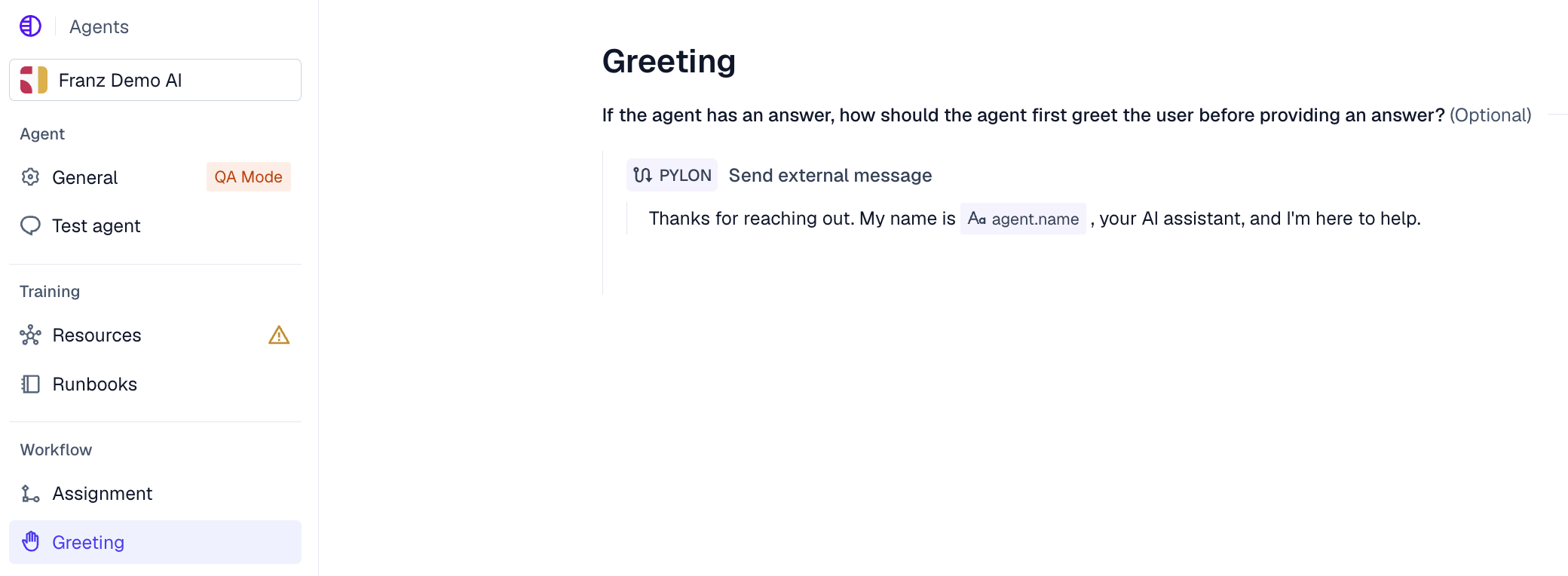
This article gives a good first overview on what you can do in this tab. Best practice for greetings are defined in the article above. In general, try to make it context dependent and not too static to avoid greetings that doesn't fit the circumstances. The Send external message action will always send the exact same message body. If you want some variation, leave the external message body out and define your greeting in plain english:

You can always try this out with an agent in QA mode.
FAQ
I don't want to double message (greetings & answer), how do I avoid that?
Duplicate greetings usually happen when greeting text is configured in more than one place. The email header/signature settings are applied in addition to the Greeting tab, including replies to Forms, so a greeting in both places can produce two openings.
To avoid this, keep the greeting in only one place. A common setup is to add the personalized greeting in the Greeting section and leave the greeting field in General → Email settings blank.
If you personalize the greeting with the customer’s name, insert the variable from the picker instead of typing it manually.
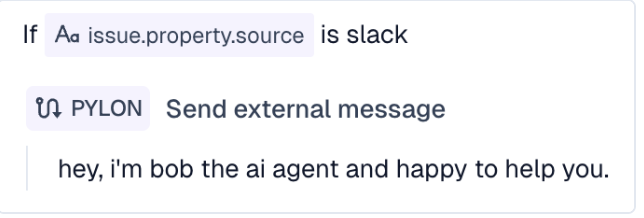
I want to adjust my greeting based on a certain sources
Add an issue specific field condition in the greetings section:
What happens if the agent doesn't know the answer? Does it greet the customer anyways and then escalates?
No, greetings only send when the agent knows the answer.
The agent would directly follow the escalation flow. If you want to send a fallback message when the agent can't answer, put that message in the Escalation settings, not in the Greeting section. You can define different message patterns for different escalation scenarios (customer has received a message vs. customer hasn't received a message) in the escalation section of your agent.
How do I stop my agent from sending unwanted introductory messages?
To disable the AI Agent greeting entirely so it answers without any greeting, open the AI Agent's configuration, go to the Greeting section, and remove all greeting steps so the section is empty. With no greeting steps configured, the agent skips the greeting and replies directly.
Check your Agent Assignment or greetings tab for “Send external message” actions. Removing these actions (whether empty or configured) will stop the agent from sending extra introductory blurbs like “Hello! I'm here to help you with your support request...”
For channel-specific control, navigate to the specific channel settings (e.g., Slack → First Reply, or similar paths for email and in-app chat) where you can delete the greeting and keep just the agent answer.