How do I map Pylon issue fields to product ticketing system fields?
Last updated: August 29, 2026
Use case
Link Pylon issue fields to specific fields in your product ticketing system (e.g. Linear, Jira) to automatically populate the fields in your product ticketing system when creating product tickets from Pylon.
How to configure
On the Integrations page, click into your connected product ticketing integration.
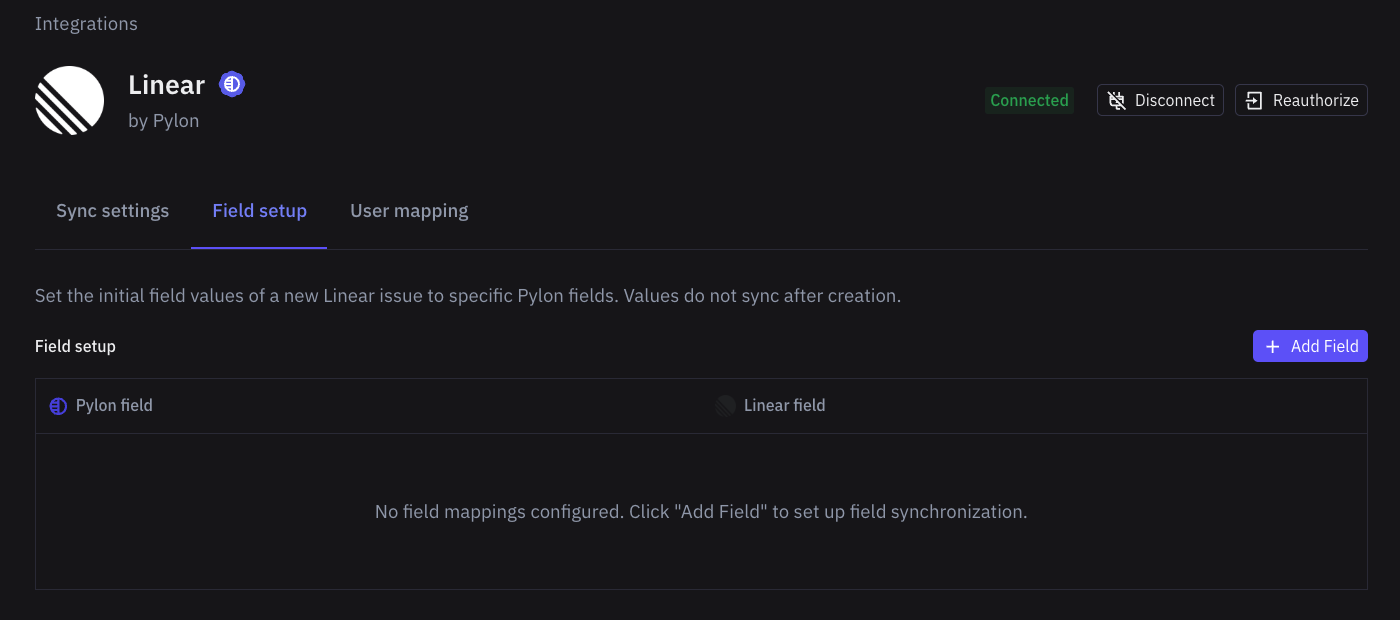
Click on the Field setup tab and click 'Add Field'
Select the Pylon field and field in your product ticketing system to set up the mapping and click 'Save'
Note: When mapping to Jira's Description field, only plain text is supported. Rich text formatting (highlights, bold, etc.) is not supported and must be applied manually in Jira after ticket creation.
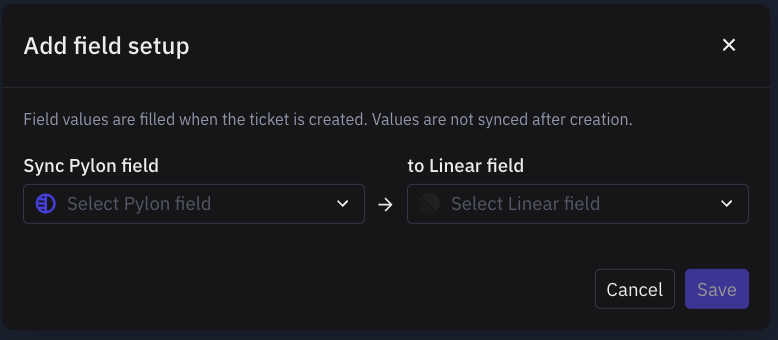
This will only set the initial value of that field on the product ticket upon ticket creation. Updates to the Pylon field will not update the field value in your product ticketing system.
Why a Jira field may be missing when you create a ticket
The fields shown in Pylon's Create Jira ticket panel depend on the Jira project and issue type you selected. If a field is missing, add a Field setup mapping for that same Jira project and issue type.
After the mapping is saved, new Jira tickets for that project and issue type can prefill the Jira field from the mapped Pylon field. For example, if you map Pylon's Account Name to Jira's Customer Account, the value prefills only when the project and issue type match the mapping and the Pylon account name exactly matches an existing Customer Account option in Jira.
Note: For Jira integrations, ticket titles and descriptions now use AI‑generated summaries based on the Pylon issue context, rather than copying the original subject and body as‑is. The AI summary includes a Pylon Issue ID at the bottom for linking purposes. There is currently no way to customize the AI prompt. If you prefer the original behavior, contact Pylon support to disable AI generation for your account.
Advanced field mapping scenarios
Using triggers for dynamic templates
You can use Pylon triggers to automatically populate different template content based on Issue Type:
Create a Pylon custom field (e.g., "Issue template") to store template text
Map this field to your product ticketing system's Description field
Create triggers with conditions for each Issue Type and actions to set the custom field with the corresponding template
Including Thread content in tickets
Internal Threads in Pylon are not automatically synced to Jira. Before creating a ticket, copy key findings from Threads into an issue Note — Notes sync to Jira comments and will be included in the AI‑generated context.
Workaround for complex field mapping
For advanced field mapping scenarios not supported by the native integration, you can use Zapier or API calls to update tickets after creation with additional Pylon field data.