How do I add an OR filter?
Last updated: June 5, 2025
Using Filter Groups in Pylon allow you to set up complex filters using both AND and OR operators. This article explains how to create filter groups within your filter conditions in Triggers, Views, or other parts of Pylon.
Using Filter Groups for OR Conditions
To create an OR filter, you'll need to use filter groups. Here's how:
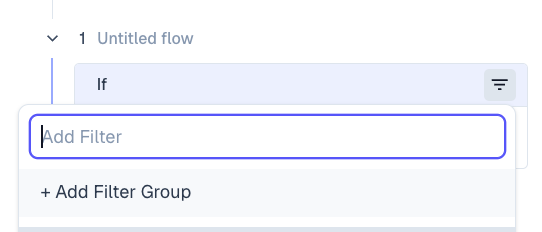
In the filter configuration, click on '+ Filter'
Select '+ Filter Group' to open the filter group creation window
Add your desired filters within the group
Click on the operator between filters to switch between AND/OR
Example: Urgent Priority with Platinum SLA
Let's walk through an example of creating the following condition:
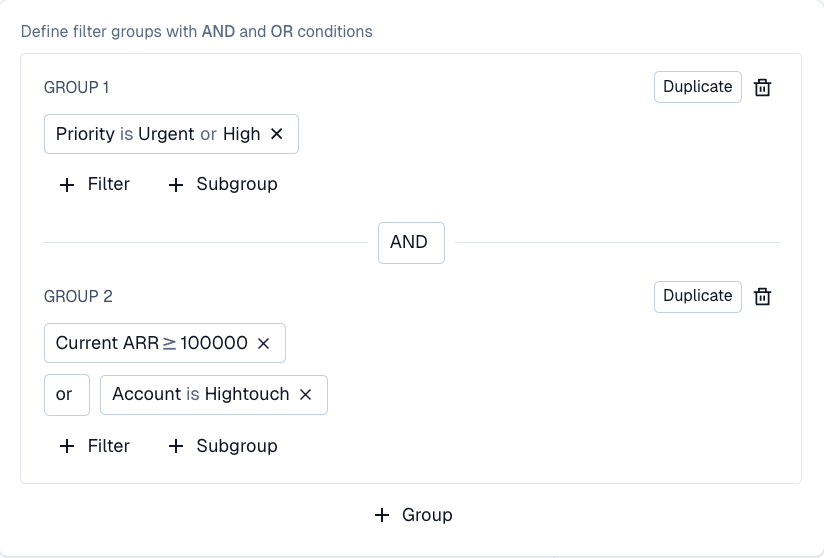
IF Priority is high or urgent AND (current ARR >= 100,000 OR account = Hightouch)
Create your first filter: "Priority is high or urgent"
Click '+ Filter Group' to create a new group
Within this group, add the following filter:
"Current ARR >= 100,000"
"Account is Hightouch"
Change the operator between these filters to OR
Tips for Complex Filters
You can add multiple filter groups to create more complex conditions
The operator between groups can also be changed between AND/OR
You can nest filter groups within other filter groups for even more complex logic