Evaluating Trigger Conditions
Last updated: July 22, 2026
If you notice triggers firing on closed tickets when they shouldn't, this is likely due to the configuration of your trigger conditions. Understanding when conditions are evaluated is key to setting up triggers correctly.
How Trigger Conditions Are Evaluated
When setting up a trigger with a time delay, there are two distinct moments when conditions can be evaluated:
At the initial trigger creation (kick-off event)
At the end of the time delay, before the action executes
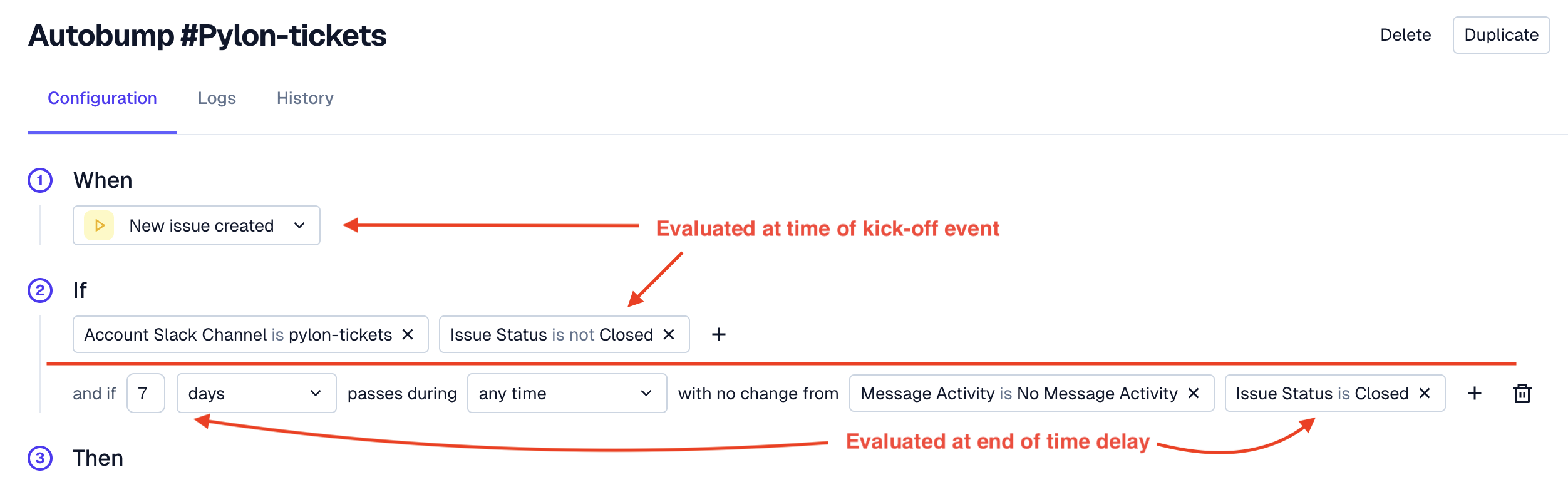
Correct Configuration
To prevent auto-bumping of closed tickets, add the "Issue is not closed" condition at the end of the time delay configuration, rather than at the kick-off event. This ensures the ticket's status is checked right before the bump occurs.