How do I use a custom domain for my customer portal?
Last updated: March 24, 2026
Pylon supports automatic SSL generation for your custom domain, and will host your customer portal behind a CDN to improve load times.
Setup
Step 1: Generate DNS values from Pylon
Navigate to the Settings tab of your Customer Portal settings page, and input your custom domain.

Pylon will generate DNS records for your SSL certificate and hosting URL.
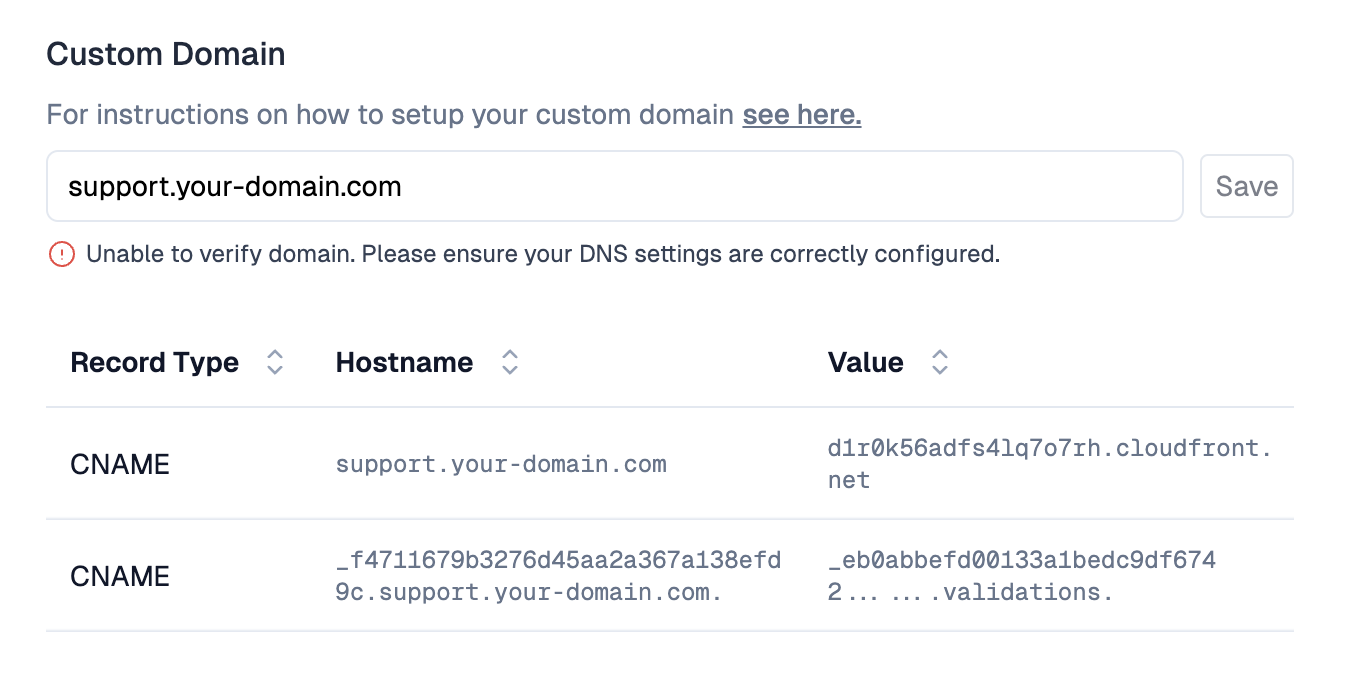
Step 2: Update DNS values in your provider
Add these CNAME records to your domain using your DNS provider (e.g. Cloudflare, Namecheap, AWS Route53). Once set, Pylon will verify your domain within 30 minutes - actual DNS propagation may take slightly longer.
Caveats
Domains with CAA records: If your domain has a CAA (Certificate Authority Authorization) record, please ensure that it includes
amazon.com. This is necessary for us to generate certificates for your domain.If you are running into errors, make sure the domain is not already connected to any existing systems.
If you are migrating from a previous AWS Cloudfront Distribution, make sure you remove the domain from the distribution's "Alternate domain names". Cloudfront only allows your domain to be associated with a single distribution, so Pylon cannot complete setup if your domain is used elsewhere.