How do I merge contacts?
Last updated: February 18, 2026
You can merge contacts directly from an account's Contacts tab in your dashboard. Here's how to do it:
Steps to merge contacts
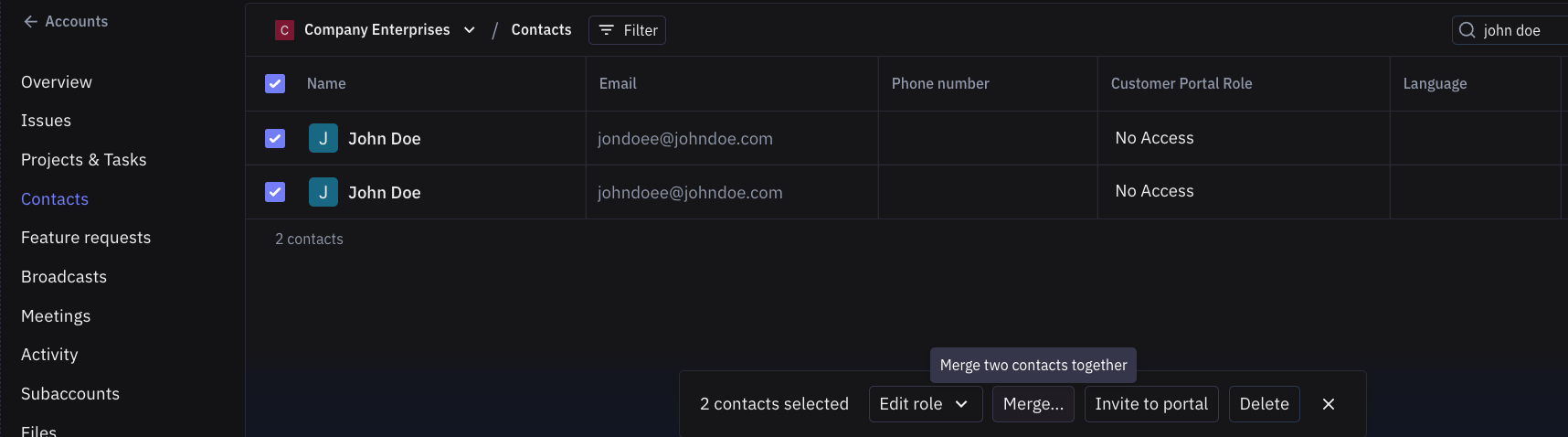
Navigate to an account's Contacts tab in your dashboard
Select the multiple contacts you want to merge
Click the merge option that appears at the bottom of the page
Important notes about contact merging
Contacts can only be merged if they belong to the same account - you cannot merge contacts across different accounts
When you merge accounts that have contacts with the same email address, those contacts do not automatically merge - they remain as separate contacts within the merged account, so you must manually merge duplicate contacts after merging account
Contact merging is entirely manual - there's no automatic merge logic or bulk merging capabilities