What are the differences between the new triggers and old triggers?
Last updated: June 4, 2025
On June 5, 2025 you'll see an updated structure and UI for triggers. All your existing triggers will continue to function without any impact.
The new triggers feature a canvas style layout with branching flows within individual triggers.
With new triggers you now can:
Have multiple flows within the same trigger
This means you can combine logic typically in many triggers into a single trigger with 'If' and 'Else if' flows
Give descriptions to individual triggers
Have multiple kickoff conditions within a single trigger (ex. When new issue created OR team assigned)
Additional debugging tools, for example seeing the active time delay queue for a trigger with time delay conditions
Be able to title and disable individual flows within the trigger
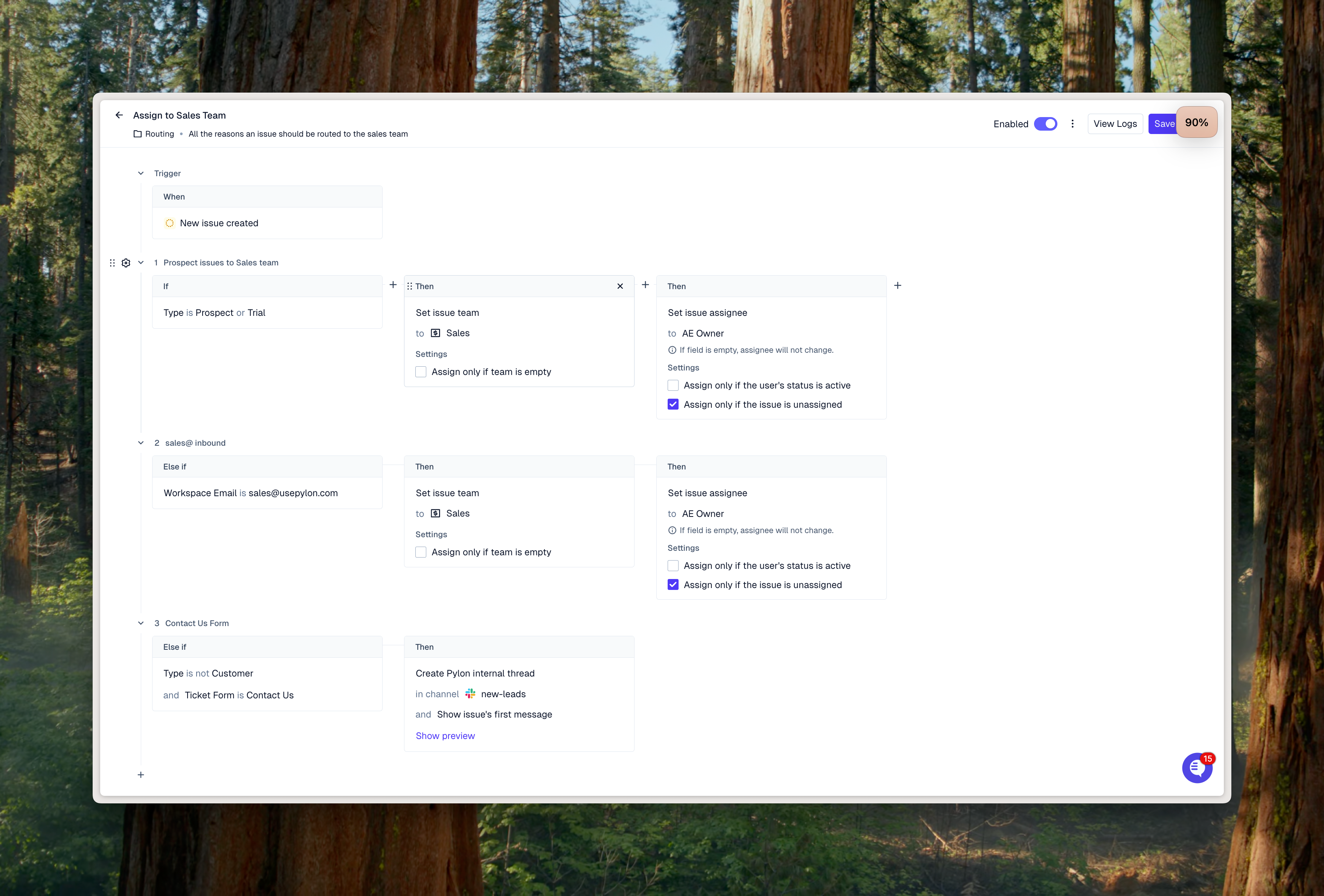
Here's an example of a trigger with multiple branches for routing issues for the sales team.
All your existing triggers will function as expected and can be edited normally - they will be visualized in the new trigger builder as a trigger with a single flow.